For more than twenty years, a Google search meant ten blue links. You typed, you scanned, you clicked. AI Mode changed that. You ask a full question, Google's Gemini model writes an answer in plain language, and you can keep asking follow-up questions as if you were talking to a person. Links to the pages it used sit alongside the answer.
For a business owner or marketer, the big question is simple: if Google answers the question itself, will anyone still visit my website? This article explains what AI Mode is, the exact dates it arrived, how it builds its answers, and what Google's own documentation tells site owners to do.
What Google AI Mode is
AI Mode is a separate tab inside Google Search. It is built for questions that need more than one search: comparisons, planning, “how do I” tasks and questions with several parts. Instead of a list of links, you get a written answer with sources, and the conversation stays open for follow-ups.
It is different from AI Overviews, the AI summary that appears at the top of normal results for some searches. AI Overviews sit inside the regular results page. AI Mode is a full AI experience of its own. You can read more about the earlier feature in our AI Overviews guide.
How AI Mode builds an answer: query fan-out
Google calls the method query fan-out. When you ask a question, AI Mode breaks it into subtopics and runs many related searches at the same time. It then reads what comes back and writes one combined answer.
Take a question like “best time to visit Manali with kids and what to pack”. A normal search treats it as one query. AI Mode may run separate searches for the weather by month, family-friendly activities, road conditions and packing lists, then put it all together.
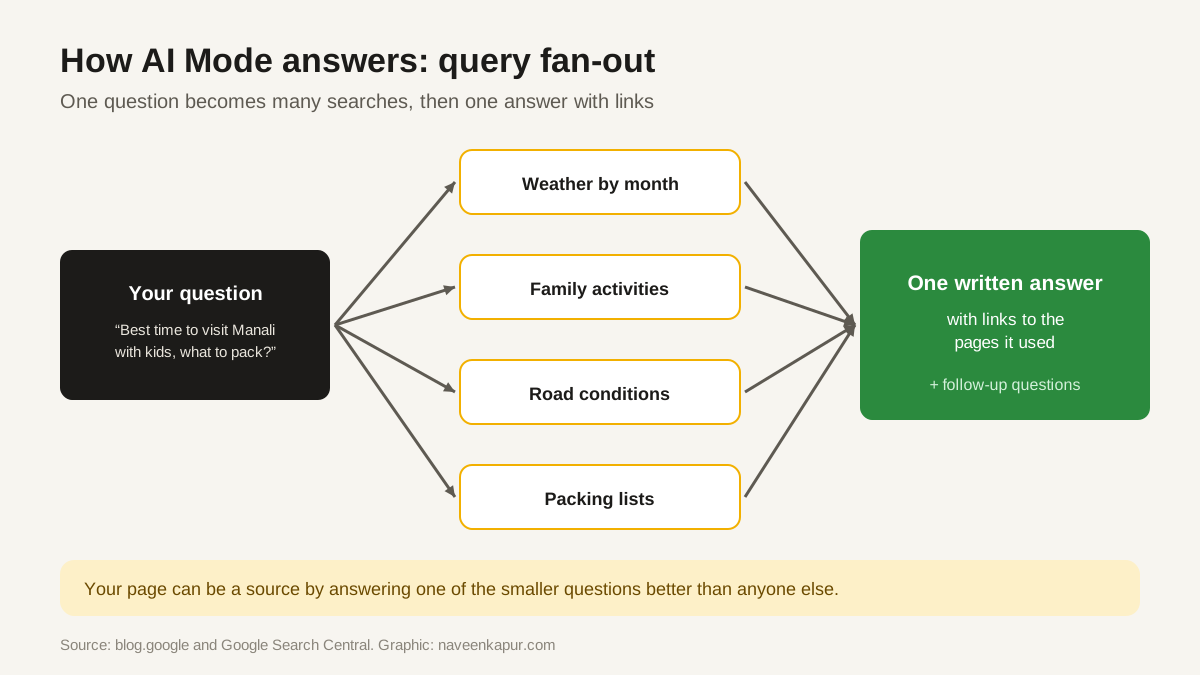
This matters for SEO. Your page does not need to answer the whole big question. It can be picked up because it answers one of the smaller questions better than anyone else. A clear, specific page on “Manali road conditions in December” has a real chance of being one of the sources.
AI Mode launch timeline
| Date | What happened |
|---|---|
| 5 Mar 2025 | Announced as an opt-in Search Labs experiment, first for Google One AI Premium subscribers, on a custom version of Gemini 2.0 |
| 20 May 2025 | Opened to everyone in the US at Google I/O; Google said a custom version of Gemini 2.5 was coming to AI Mode |
| 24 Jun 2025 | Launched in India as a Labs experiment, in English |
| 8 Jul 2025 | Opened to everyone in India in English, no Labs sign-up needed |
| 21 Aug 2025 | Expanded in English to more than 180 new countries and territories |
| 8 Sep 2025 | Added Hindi, Indonesian, Japanese, Korean and Brazilian Portuguese |
| 7 Oct 2025 | More than 35 new languages and 40+ new countries; over 200 countries and territories in total |
What Google says website owners should do
Google's Search Central page “AI features and your website” is the official word for site owners, and it is calm. The key points:
- No extra requirements. Google says there are no additional requirements to appear in AI Overviews or AI Mode, and no special optimisations needed.
- The basics decide it. A page must be indexed and eligible to be shown with a snippet. The same SEO fundamentals apply as for normal Search.
- No new files. Google says you do not need to create new machine-readable files, AI text files or special markup.
- Same reporting. Clicks and impressions from AI features are counted in the Search Console Performance report, under the “Web” search type.
- Same controls. nosnippet, data-nosnippet, max-snippet and noindex limit what can be shown, just as they do for normal snippets.

What AI Mode changes in practice
Even if the rules are the same, the way people search is shifting. Three practical effects are worth planning for:
- 1Questions get longer. People ask AI Mode full questions with conditions: budget, city, age, deadline. Pages that answer specific, real situations have more chances to be used as a source.
- 2Simple facts get answered on Google. A page that only states a fact (opening hours, a definition) may get fewer clicks, because the answer appears on Google. Pages with depth, tools, prices, comparisons or local detail give people a reason to click.
- 3Trust signals matter more. When Google picks a handful of sources, it leans on pages that look reliable: a clear author, first-hand detail, accurate facts. That is the same idea as E-E-A-T.
A practical checklist for AI Mode
- Check the important pages are indexed (Search Console, URL Inspection).
- Make sure you are not blocking snippets by mistake with nosnippet or a very short max-snippet.
- Write sections that each answer one clear sub-question, with the answer in the first two sentences.
- Add the details only you know: your prices, your process, your photos, your local knowledge.
- Keep pages fast and usable on phones (Core Web Vitals and mobile-first indexing still apply).
- Watch Search Console trends by page, not just total clicks, to see which pages gain or lose.
Where AI Mode came from
AI Mode is the latest step on a long road. In 2019 Google added BERT to understand the meaning of searches. In 2021 it announced MUM. In May 2023 it tested the Search Generative Experience in Labs, which became AI Overviews in May 2024. AI Mode takes the same idea further: understand the full question, search widely, and give one useful answer with links.
The direction has not changed in all those years. Google wants to send people to the page that best answers their real question. A site that does that well, and is technically easy for Google to read, is in a good position whichever way results are shown.