When Google launched Core Web Vitals in 2020, responsiveness was measured by First Input Delay (FID). Almost every site passed it. That sounded like good news, but it mostly showed that FID was measuring too little.
On 12 March 2024 Google replaced FID with Interaction to Next Paint (INP). Many sites that had always been “green” for responsiveness turned orange or red overnight. Nothing on those sites had changed; the measurement had become honest.
What INP measures
Every time a visitor taps a button, clicks a menu or types in a box, the browser has to run some code and then draw the result on screen. INP measures how long that takes, from the moment of the tap to the next frame painted on the screen.
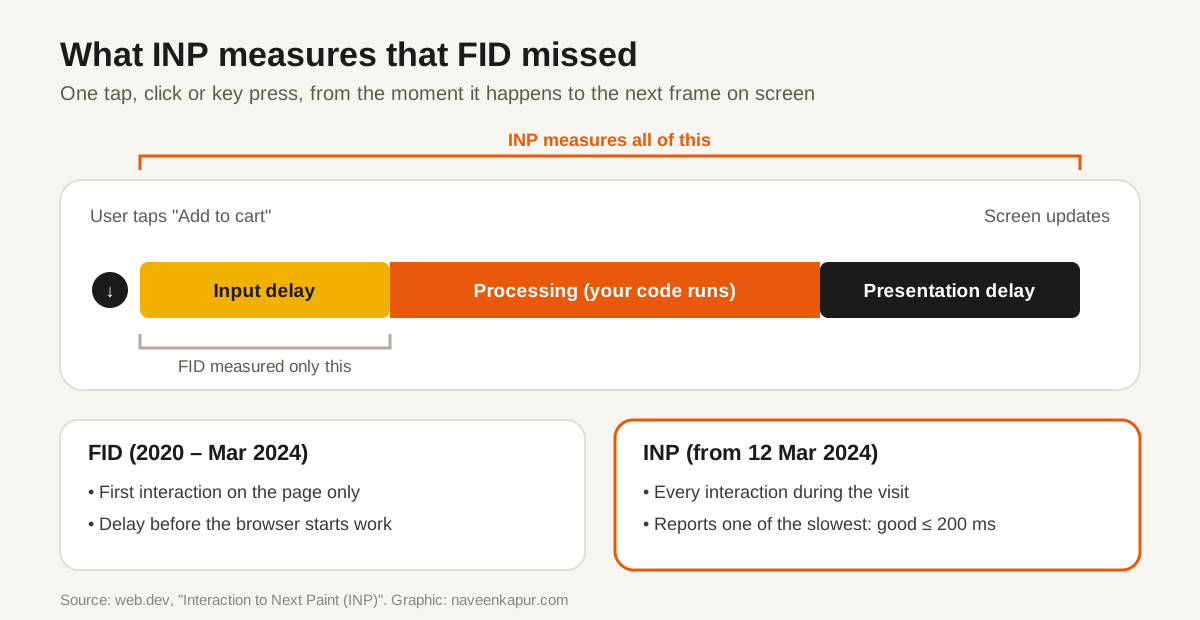
- Input delay
- The browser is busy with something else and cannot start handling the tap yet.
- Processing time
- The site's own code runs in response to the tap.
- Presentation delay
- The browser works out the new layout and draws the next frame.
INP watches all interactions during the visit and reports one of the slowest. On pages with many interactions it ignores a small number of extreme outliers, so one freak delay does not ruin the score. Scrolling and hovering are not counted.
INP vs FID
| FID (2020 – Mar 2024) | INP (from 12 Mar 2024) | |
|---|---|---|
| Which interactions | Only the first one | All taps, clicks and key presses |
| What part of the wait | Input delay only | Input delay + processing + presentation |
| Good | ≤ 100 ms | ≤ 200 ms |
| Poor | > 300 ms | > 500 ms |
How it got here
| Date | Event |
|---|---|
| May 2022 | INP introduced as an experimental metric |
| May 2023 | Google announces INP will replace FID in March 2024 |
| 12 Mar 2024 | INP becomes a Core Web Vital; FID is retired |
| Sep 2024 | FID removed from Chrome tools and reports |
Why sites fail INP
The browser's main thread can do only one thing at a time. If it is busy running a long JavaScript task when the visitor taps, the tap waits. Common culprits:
- Third-party scripts: chat widgets, ad scripts, heatmaps, tag managers loading many tags, social embeds.
- Heavy themes and page builders that ship large amounts of JavaScript on every page.
- Big pages: very large HTML makes every layout and repaint slower.
- Code that does everything at once after a click, such as filtering hundreds of products before showing anything.
How to find your slow interactions
- 1Search Console → Core Web Vitals: shows which groups of pages fail INP on real visits.
- 2PageSpeed Insights: the field data section shows INP for a URL or the whole site.
- 3Chrome DevTools → Performance panel: record yourself using the page and look for long tasks (red corners) around each click.
- 4web-vitals library with attribution: sends the slow element and the cause to GA4, so you see real problems from real users.
How to fix a poor INP
- Remove scripts you do not need. Audit every third-party tag; each one costs time on every page.
- Delay non-essential scripts until after the page is usable, or until the visitor interacts.
- Break up long tasks. Let the browser draw a response first, then do the rest of the work in smaller chunks.
- Give instant feedback. Show a pressed state or spinner straight away so the next frame appears fast.
- Keep pages lean. Fewer page elements means faster layout and paint.
INP is measured on real visits, mostly on phones, so it ties directly to mobile-first indexing: the experience on a phone is the one Google counts.